Projects & tasks
Projects are Sally's core unit of work: a container per brand (workspace) with its own Kanban board, tasks, labels, members, timesheets, and an optional linked client. Everything on this surface is available in the web UI, over the HTTP API, and over MCP — so a person and a connected agent work the same board under the same permission model. The signature piece is the handoff and resume-context flow that lets humans and agents pass work back and forth without losing the thread.
Projects
A project groups related work under one brand and rolls up its own statuses, tasks, labels, timesheets, and members. You can create, edit, archive (a reversible soft-archive), and hard-delete projects.
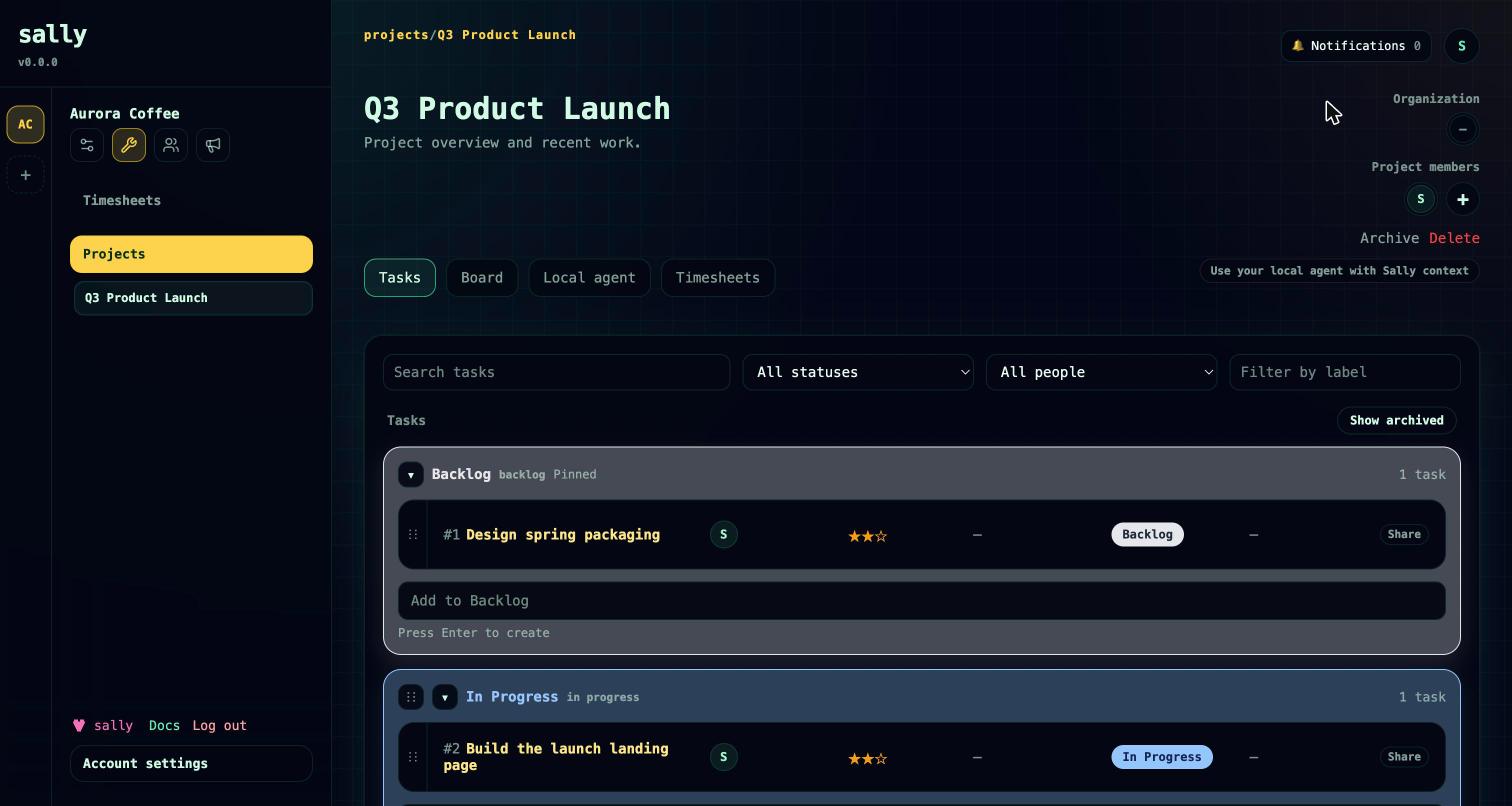
- Default board. New projects seed five statuses — Backlog, In Progress, Blocked, Review, Done — which you can rename, recolor, reorder, add to, or remove.
- Members and roles. Owner, Member, and Viewer roles per project (see Roles and visibility).
- Linked client. A project can be linked to a CRM organization, connecting delivery work to the relationship and to client-level timesheet rollups. ("Client" and CRM organization are the same object — see CRM.)
Agents get a purpose-built onboarding entry point: project.runtime_context returns a project summary, statuses with task counts, open and blocked tasks, relevant memory, CRM context, open blockers, pending approvals, the workspace trust policies, and a recommended workflow — everything an agent needs to ground itself before acting. project.get returns the same board in detail for the UI.
MCP: project.list, project.get, project.create, project.update, project.archive, project.delete, project.runtime_context.
Boards & statuses
Each project is an ordered set of Kanban status columns. Every status carries a free-form name and color plus a semantic type that drives automation: BACKLOG, TODO, IN_PROGRESS, BLOCKED, REVIEW, or DONE. The type is what lets Sally — and agents — reason about a column; for example, a handoff that needs sign-off moves a task into a REVIEW-type status.
- Add a status (appended to the board), rename, recolor, or reorder it.
- Deleting a status migrates its tasks to a target or fallback column; Sally refuses to delete the last remaining status or the last
BACKLOGstatus. - Move a task to another column by status name, or drag-and-drop to reorder tasks within a column.
MCP: project.status.create, project.status.update, project.status.delete, project.status.reorder, task.move, task.reorder. Status changes require the project Owner role.
Tasks
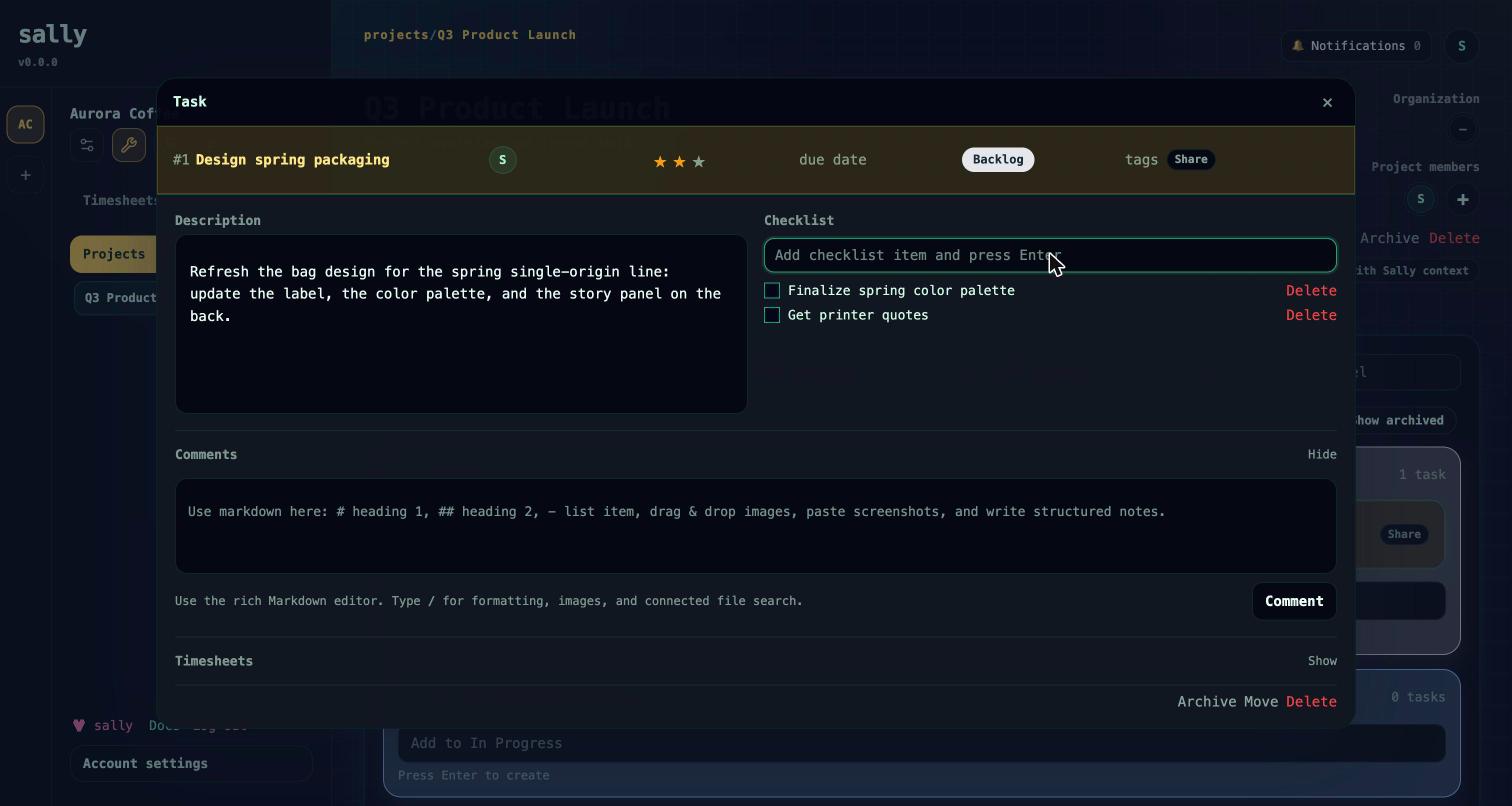
Tasks are atomic work items, numbered sequentially within their project. Each task carries a title, a rich Markdown description (with inline image upload), a priority, an optional due date, people, labels, a checklist, comments, dependencies, timesheets, and — when relevant — blockers and approval requests.
- Priorities. P1 (high), P2 (medium, the default), P3 (low).
- People. Each task has an owner and participants — humans or agents — who must be project members (added automatically when assigned). Assigning someone notifies them.
- Move and organize. Move tasks between statuses, reorder them within a column, and move a task to another project in the same brand. Tasks soft-archive or hard-delete.
- Filtering. List tasks by status, assignee, label, archived state, or free-text search.
task.getreturns full detail: comments, checklist, dependencies, connected resources, pending approvals, open blockers, and scoped timesheets. - Hand a task to an agent. Every task — list row, board card, and detail — has a Share link and a Prompt button. Prompt copies a ready-to-paste agent prompt: the workspace, project, and task IDs plus step-by-step instructions to pick the task up over the Sally connector (fetch it with
task.get, do the work, tick todos, update status, and comment).
MCP: task.list, task.get, task.create, task.update, task.archive, task.delete, task.move, task.reorder, plus task.description.image.add and task.comment.image.add for inline images.
Labels & checklists
- Labels are project-scoped tags with a name that's unique within the project. Reference a label that doesn't exist yet and it's created automatically.
task.labels.updatesets the full label set on a task — it replaces the current labels rather than adding to them. - Checklists are ordered todo items on a task — text, a done flag, and a position. Seed them when you create the task, then add, check off, edit, reorder, or delete them. The first not-done todo doubles as a fallback "next action" in resume-context.
MCP: task.labels.update, task.todo.create, task.todo.update, task.todo.delete, task.todo.reorder.
Comments & mentions
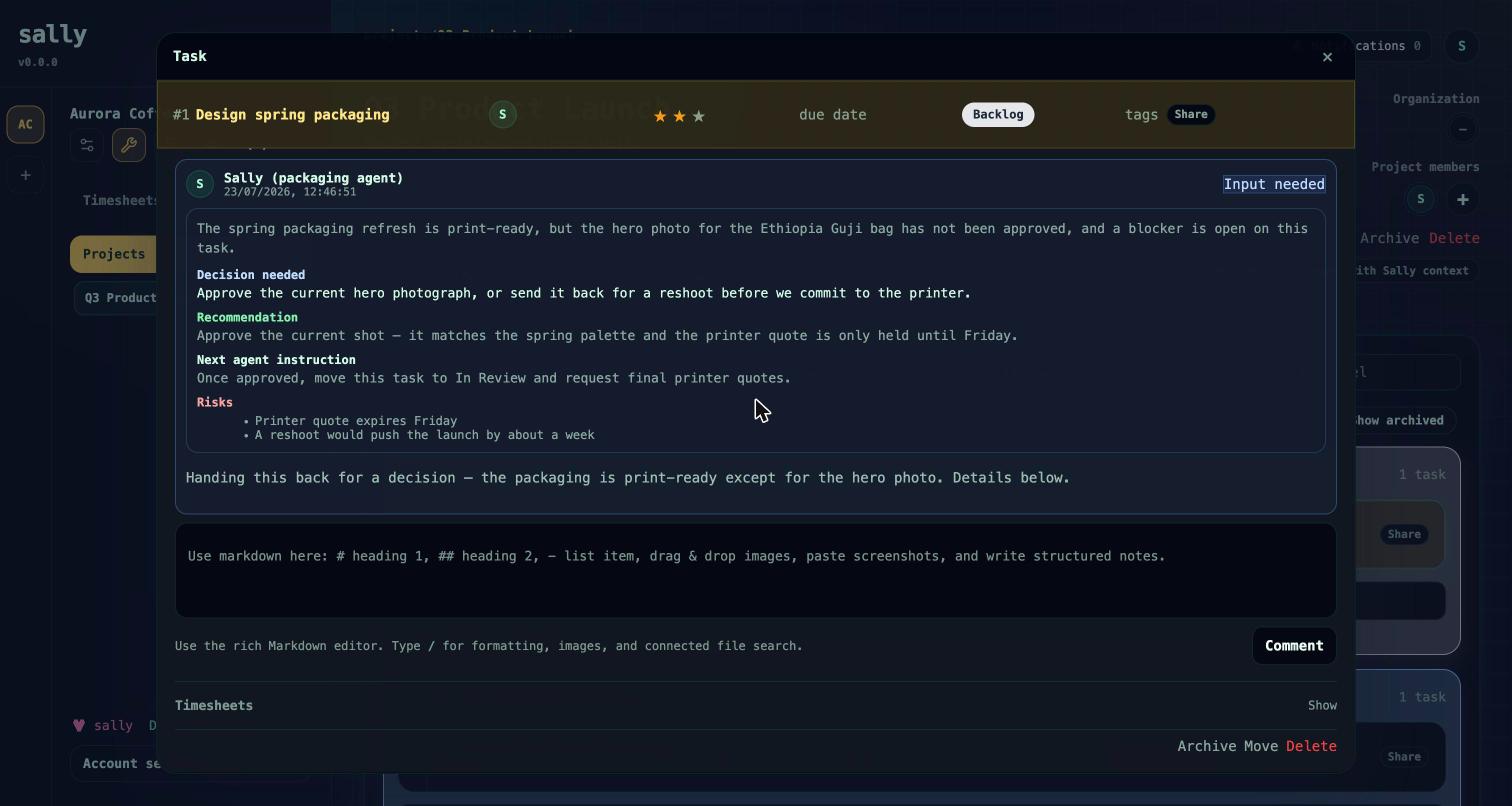
Comments use the same rich editor as descriptions, including inline images. Each comment records its author and an optional set of @mentions; mentioning a project member notifies them. Most comments are general discussion, but Sally also writes structured system comments — notably the task-handoff and attention briefs described below — so the human conversation and the agent audit trail live in one place.
MCP: comment.add, task.comment.image.add.
Dependencies & blockers
Two different relationships keep work honest:
- Dependencies link one task to another ("this can't start until that's done"). They're returned by
task.getandtask.list; you add and remove them in the web UI. Projects can likewise depend on other projects. - Blockers are first-class objects meaning "work cannot proceed until a human resolves something." A blocker has a type — such as
CREDENTIAL,ACCESS,CLIENT_DECISION,LIVE_APPROVAL,DEPENDENCY,AMBIGUITY, orTEST_FAILURE— a status (open, resolved, or cancelled), a summary, and the input it needs. Blockers are created through the handoff flow below, which moves the task into aBLOCKEDstatus, and they surface inproject.runtime_context,task.get, andtask.resume_context. See Governance for how blockers, approvals, and evidence fit together.
Handoff & resume-context
This is the flow that makes human + agent collaboration on a task actually work. Instead of dropping a status change with no explanation, whoever was working the task leaves a structured record of where things stand, and whoever picks it up gets that record back.
Handoff — task.handoff.create hands work back with a structured brief: a title, the decision needed, a context summary, a recommendation, an instruction for the next worker, and known risks — plus normalized evidence (sources consulted, checks performed, decisions, assumptions, outputs, a confidence level, and next steps). Depending on the situation, the handoff:
- creates a real blocker and moves the task to
BLOCKED, or - files an approval request and moves the task to
REVIEW, or - moves the task to a suggested status.
Resume-context — task.resume_context is the inverse. It returns the latest handoff, the most recent decision and evidence, open blockers, pending approvals, recent comments and events, related memory, and a computed recommended next action — walking down from any open blocker, to a pending approval, to a review-or-blocked state, to a rejected decision, to the handoff's next step, and finally to the first unchecked todo. An agent — or a person returning to the task days later — calls it and knows exactly where to pick up.
MCP: task.handoff.create, task.resume_context, project.runtime_context. Agent keys need the handoff:create scope. See Connect your agent and Governance.
Roles & visibility
Project access uses three roles: Owner, Member (the default), and Viewer.
- Owner manages the board, members, and status structure; a project always keeps at least one owner.
- Member works within the project, scoped to the tasks they own or participate in.
- Viewer is read-only, with people fields and timesheets hidden.
Workspace owners and the project creator are added as project owners automatically, and workspace-level roles set the outer bound on what any credential — a person, an API key, or an agent's MCP key — can do. An agent's reach on a project is never broader than the credential behind it.
MCP: project.member.list, project.member.add, project.member.update, project.member.remove. Member changes require the project Owner role.
Connected files
If your account has cloud storage connected (see Security), you can search Google Drive, Microsoft 365 / SharePoint / OneDrive, or Dropbox from task descriptions and comments and insert file links directly. Connected resources are managed in the web UI.
Shareable URLs
Projects and tasks have canonical, brand-scoped URLs:
/workspaces/:workspaceId/projects/:projectId
/workspaces/:workspaceId/projects/:projectId/tasks/:taskId
Links keep working for teammates even when they currently have a different brand selected.
With agents
Everything above is exposed over MCP, so a connected agent can read board state, create and update tasks, move them across statuses, manage labels and checklists, comment, and — when it finishes or gets stuck — file a structured handoff with a blocker, an approval request, or a status move and recorded evidence. A practical pattern: point an agent at a project with project.runtime_context, let it work under the governance model, and have it hand back anything risky or ambiguous for a human to resolve. See Connect your agent.
Roadmap
- Task-to-task and project-to-project dependencies are managed in the web UI today; MCP tools for editing them are not yet exposed.
- Sally tracks tasks natively. Two-way sync with external trackers (Jira, Linear, GitHub) is planned but not yet available.