Memory
Every brand (workspace) in Sally has an operational memory: durable, typed knowledge — the "brand brain" — linked to the projects, tasks, and customer records it belongs to. Memory is what lets an agent, or a new teammate, start informed instead of starting over: read the relevant facts, decisions, constraints, and brand voice before acting, then write back what was learned.
Memory items
Each memory item has a type, a title, a body, and optional links to the entities it concerns. The types are:
- Fact — something true about the brand or its situation
- Decision — what was decided, and the context that made it right
- Lesson — what worked or went wrong
- Constraint — limits that apply: budget, legal, technical
- Preference — how this brand likes things done
- Workflow — how a recurring process runs
- Warning — what the next person should not repeat
- Brand voice — how the brand sounds
- Campaign learning — which angles, subjects, and audiences performed
- Strategic, Product, Customer, Market, Relationship — durable business context
An item can be marked verified, carry a confidence score, and link to a project, task, campaign, CRM organization, person, or deal, and to the global relationship graph. Verified memory is the trusted layer agents ground themselves on before planning or acting.
Over MCP, items are read and written with memory.list, memory.get, memory.create, and memory.update.
A brand's memory reads as a list of typed items, each with a verified badge, a confidence score, and optional links to the work it grounds:
| Item | Type | Verified | Linked to |
|---|---|---|---|
| House espresso ratio is 1:2 in ~28s | constraint |
✓ | — |
| Warm, plain brand voice — no hype | brand_voice |
✓ | — |
| Dropped the oat-milk supplier over quality | decision |
✓ | Meridian Roasters |
| 12 lapsed spring single-origin buyers | fact |
— | Q3 Product Launch |
Verified items sort to the top and are the trusted layer agents ground themselves on; unverified items still surface but signal "treat as a lead, not a fact."
Semantic search
Memory is searchable by meaning, not just keywords. Sally runs a self-hosted embeddings model (BAAI/bge-m3) — text is embedded on write, so a search for "how do we handle refunds" surfaces the relevant decision even when it never uses those exact words. Where no embeddings server is configured, search falls back to keyword and recency ranking, so it always returns results.
Search and filtering are available in the UI and over MCP with memory.search (semantic) and memory.list (filter by type and by linked project, task, or CRM record).
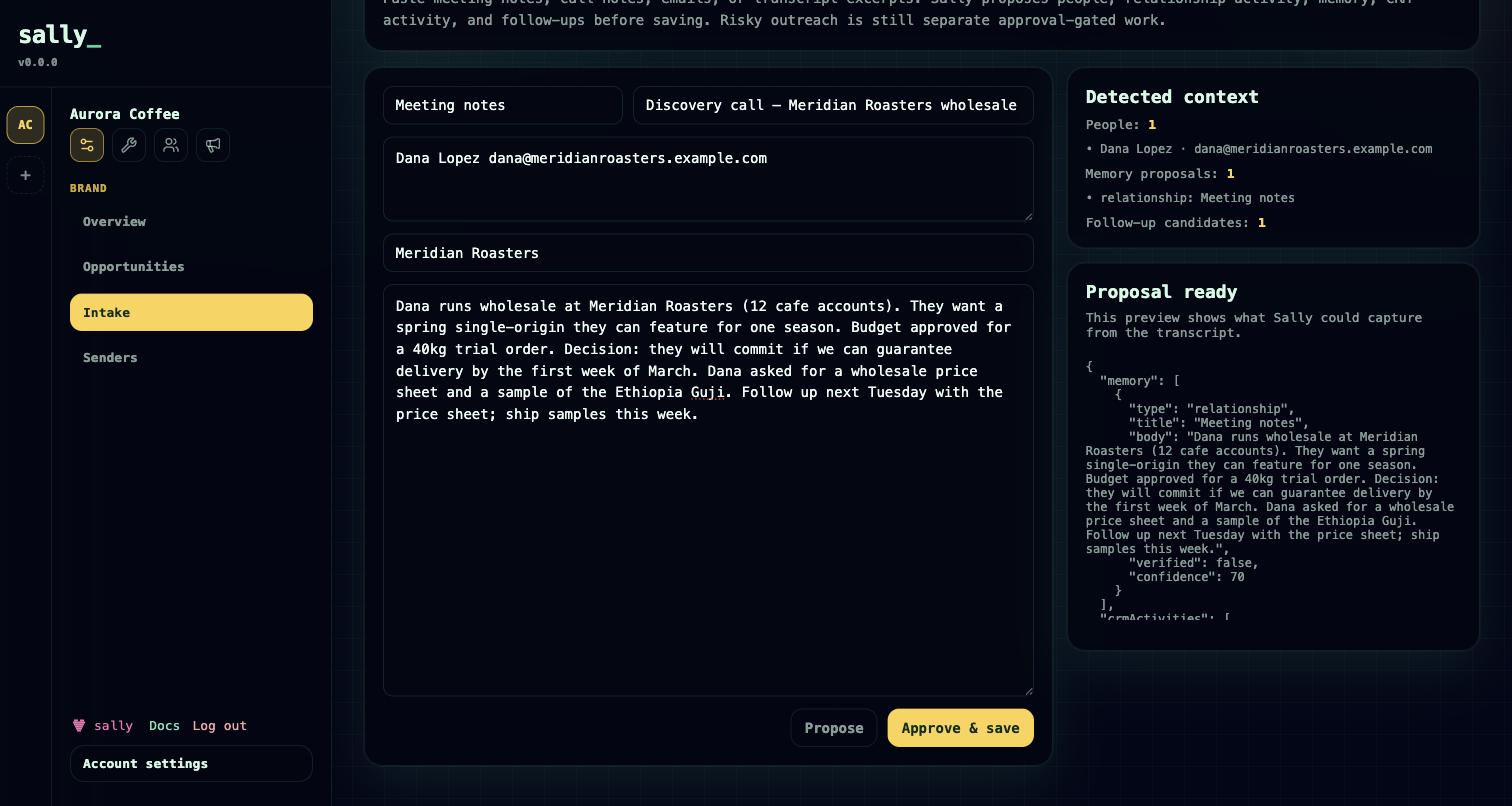
Meeting-notes intake
Intake turns raw material — a meeting transcript, call notes, a braindump — into structured records, in two steps so nothing lands by surprise:
- Preview (
memory.intake) — Sally reads the text and proposes what it would create: memory items, CRM activities, relationship context and identities, follow-ups, and tasks. No writes happen at this step. - Execute (
memory.intake.execute) — the proposed records are written where they belong, linked to the entities they mention. This resolves or creates relationship identities, then creates the memory items, CRM activities, follow-ups, and tasks, and records an audit event.
Intake never sends external outreach — it only writes internal records. Review the preview, adjust, then execute.
How agents use memory
Memory closes a loop around agent work:
- Before work, an agent pulls the relevant memory — brand voice, constraints, prior decisions, warnings — as part of grounding itself. It arrives with
sally.contextand a project's runtime context. See Connect your agent. - During work, semantic search (
memory.search) lets the agent look up specific context on demand. - After work, decisions and lessons are written back with
memory.create, or captured in bulk through intake.
This is what makes agent output improve over time instead of resetting every session. Meeting-notes intake writes structured memory from a meeting in one governed step and connects to the CRM, where the same intake pass produces activities, follow-ups, and relationship context.
Roadmap
Relationship identities in the global graph are today created implicitly through intake; there are no standalone create or update tools for them yet.