HTTP API
Sally's web app runs on the same HTTP API you can call directly — the same routes, the same account, workspace, project, and key-scope permission checks. It's the right fit for scripts, sync jobs, and custom integrations. If you're wiring up an AI agent instead, the hosted MCP surface is usually the better path — it exposes the same capabilities as governed, self-describing tools.
The base URL is https://app.usesally.com/api. Every path below is relative to it.
Authentication
Every request resolves to a Sally Account, and a request can never reach further than the account, key, or connection behind it — the same permission model humans and agents share. There are three credential types:
- Session token — what the web app uses. Sign in with
POST /auth/login(email + password); if the account has a second factor, that returns a challenge you complete withPOST /auth/login/2fa. A successful login returns asessionToken. Send it asAuthorization: Bearer <token>orX-Session-Token: <token>. Sessions last up to 30 days by default (admins can shorten this) and can be revoked at any time. - Personal API key — a long-lived key prefixed
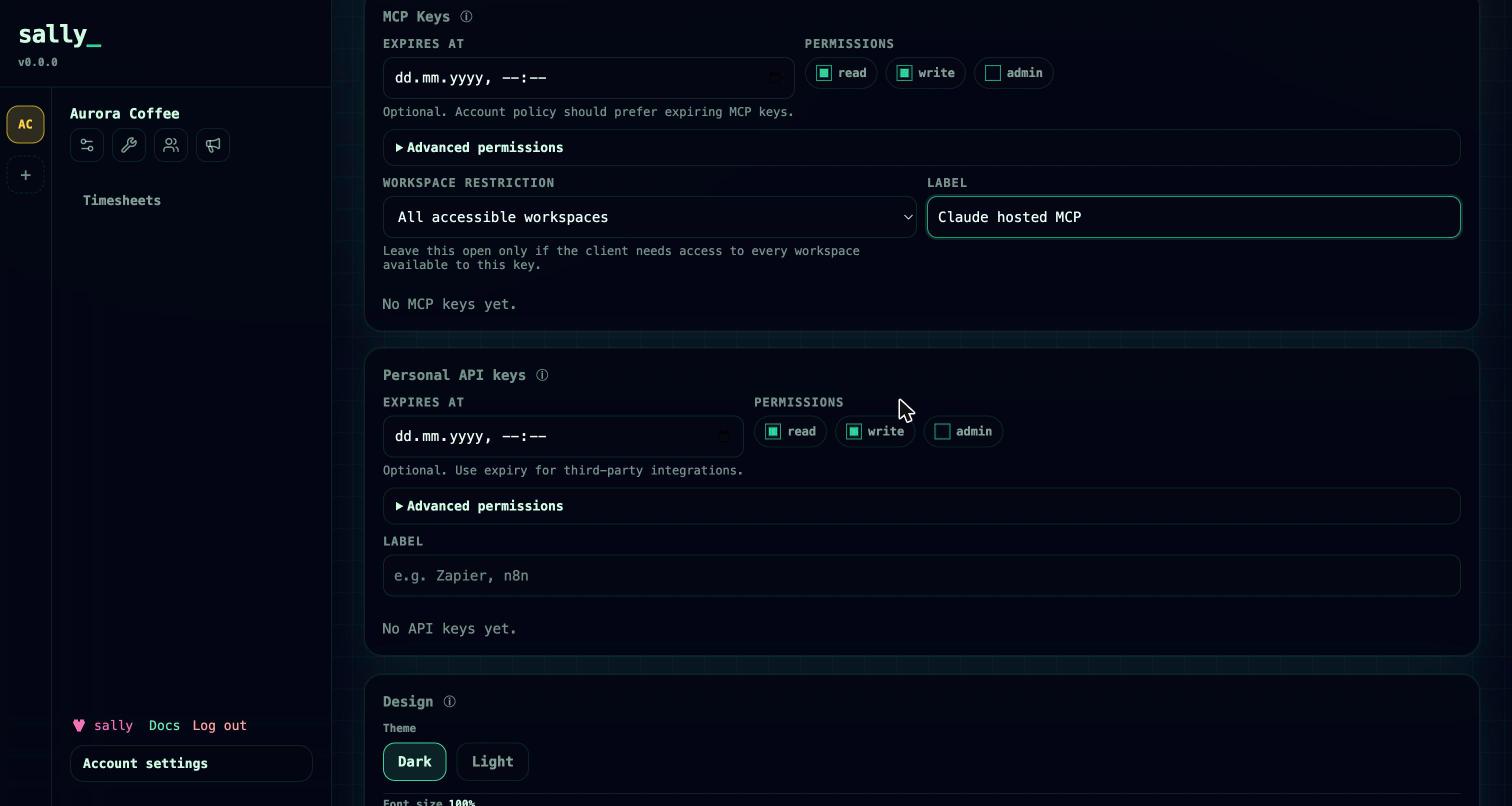
atpm_, created and revoked under Profile → security (GET/POST/DELETE /auth/api-keys). Send it asX-Api-Key: <key>orAuthorization: Bearer <key>. Best for scripts and server-to-server integrations. - Hosted MCP key — a key prefixed
sallymcp_, primarily for the hosted MCP endpoint but also accepted on the HTTP API. Send it asAuthorization: Bearer <key>. An MCP key can be pinned to a single workspace; requests that name any other workspace are denied.
X-Api-Key: atpm_…
Keys carry scopes (for example read, write, admin, and finer agent scopes like tasks:write or crm:read). A request that needs a scope the key doesn't hold is rejected with 403 and a body of { "ok": false, "error": "…", "code": "KEY_SCOPE_DENIED", "requiredScope": "…" }. Account admins can require key expiry and restrict who may create keys — see Security.
A handful of routes need no credential: GET /health, the sign-in and invite/reset flows (/auth/login, /auth/login/2fa, /auth/accept-invite, /auth/invite-info, /auth/request-password-reset, /auth/reset-password), signup (/signup, /signup/confirm), public marketing embed/webhook endpoints, and served upload assets under /uploads.
Workspace context
Most resources belong to a brand (workspace). Name the brand on each request with a header:
X-Workspace-Id: <workspaceId>
or
X-Workspace-Slug: <workspaceSlug>
The same values also work as workspaceId / workspaceSlug query parameters. If you authenticate with a workspace-pinned MCP key, the pin decides the context (and conflicting values are refused). If you belong to exactly one brand and pass nothing, Sally uses it.
Main resources
The API mirrors the product surface. Collections are GET, creates are POST, updates are PATCH, and removals are DELETE.
| Area | Representative routes |
|---|---|
| Workspaces | GET/POST /workspaces, GET/PATCH /workspaces/:id, …/members, …/roles |
| Projects | GET/POST /projects, GET /projects/summary, GET/PATCH/DELETE /projects/:id, …/tasks, …/statuses, …/labels, …/members, …/dependencies |
| Board | GET /board |
| Tasks | GET/POST /tasks, GET/PATCH/DELETE /tasks/:id, …/comments, …/todos, …/labels, …/move, …/archive, …/dependencies |
| Handoff & resume | POST /tasks/:id/handoff, GET /tasks/:id/resume-context, GET /projects/:id/runtime-context |
| Clients | GET/POST /clients, GET/PATCH/DELETE /clients/:id |
| CRM | GET/POST under /crm/organizations, /crm/people (POST /crm/people/:id/email), /crm/deals, /crm/activities, /crm/follow-ups |
| Relationships | GET /relationships/people, GET /relationships/organizations |
| Marketing | /marketing/contacts, /marketing/audiences, /marketing/senders, /marketing/messages, /marketing/campaigns, /marketing/forms, /marketing/content-gates, /marketing/deliveries, /marketing/approvals, /marketing/fields, /marketing/settings, /marketing/commerce/* |
| Memory | GET/POST /memory, GET/PATCH/DELETE /memory/:id, POST /memory/intake, POST /memory/intake/execute |
| Timesheets | GET/POST /timesheets, GET /timesheets/report, GET /timesheets/users |
| Governance | GET/POST /agent-proposals, /agent-trust-policies, /approval-requests, /blockers, GET /blocked-tasks, GET /operational-events |
| Account & keys | GET /auth/me, GET/PATCH /auth/profile, /auth/api-keys, /auth/mcp-keys, /notifications |
Client and CRM Organization are the same user-facing record; the /clients routes stay for compatibility. For the full, self-describing catalog an agent can call — sally.context, task.handoff.create, memory.intake / memory.intake.execute, proposal.create, and the rest — see Connect your agent.
Response shape
The response shape is not uniform — this is a deliberate note so you parse defensively rather than a promise of an envelope:
- Writes typically return a small confirmation envelope, e.g.
POST /projects→{ "ok": true, "projectId": "…" }. - Reads typically return the data directly — a raw array or object, not wrapped in
{ ok, data }. - Errors return the matching HTTP status with
{ "ok": false, "error": "<message>" }. Scope failures addcodeandrequiredScopeas shown above.
Check the HTTP status first, then read the body for the shape that route returns.
Example
curl -s https://app.usesally.com/api/projects \
  -H "X-Api-Key: $SALLY_API_KEY" \
  -H "X-Workspace-Slug: my-brand"
curl -s -X POST https://app.usesally.com/api/tasks \
  -H "X-Api-Key: $SALLY_API_KEY" \
  -H "X-Workspace-Slug: my-brand" \
  -H "Content-Type: application/json" \
  -d '{"projectId": "…", "title": "Draft June newsletter", "priority": "P2"}'
Permissions and governance
HTTP calls pass the same checks as the web app — workspace roles, project roles, custom roles, and key scopes all apply. Risky, hard-to-reverse actions (marketing mass sends, publishing, deletions, exports) route through the same approval flow no matter how they're triggered, so an agent or script can't quietly do something a person would have to confirm. See Governance for the proposal, trust-policy, and approval model.
Roadmap
- The ChatGPT connector ships a curated REST facade (
/chatgpt/*) plus a generated OpenAPI schema as a private prototype; the general HTTP API above is the supported surface today. - External work-item sync (Jira, Linear, GitHub) is modeled but not yet wired; only Sally-native items are exercised today.