Connect your store
Connect a Shopify or WooCommerce store so its activity flows into Sally as it happens. Orders, checkouts, refunds, and cancellations become typed commerce events that resolve to contacts, build a per-customer value profile, add new buyers to your CRM, and trigger marketing automations — all sharing one context.
Store connections live per brand, under Marketing → Integrations → Store connections. One store connects per brand; connecting a different domain replaces the previous one. Because every connector feeds the same event pipeline, adding a platform is an adapter, not a new product — the receiver, ingest core, triggers, campaigns, and UI stay the same.
Agents can drive the whole setup under governance: commerce.store.list, commerce.store.connect, commerce.store.register_webhooks, commerce.store.disconnect, commerce.product.sync, and commerce.product.list.
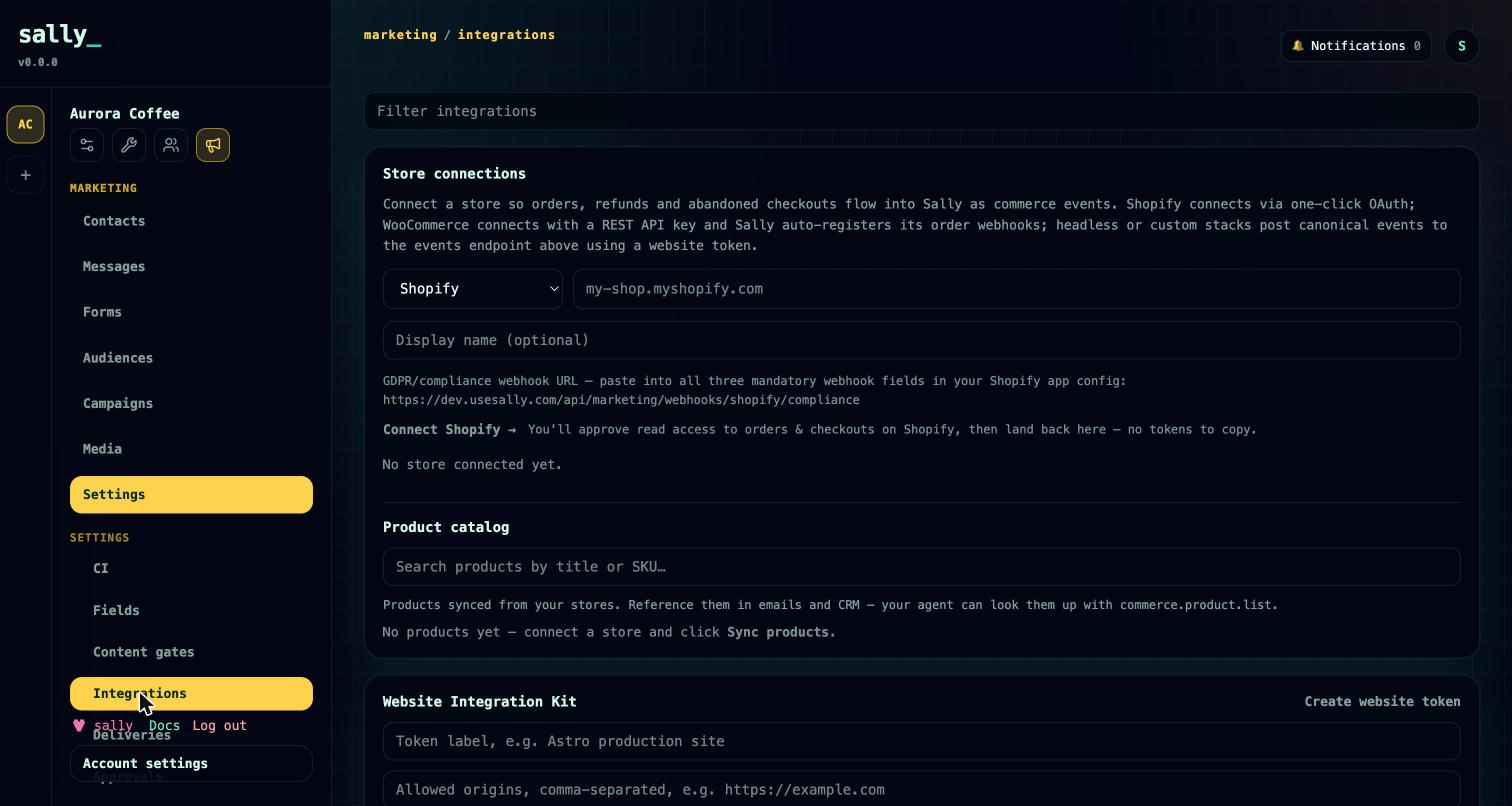
Connect Shopify
Shopify connects over OAuth — no tokens to copy:
- Open Marketing → Integrations → Store connections, choose Shopify, and enter your
myshopify.comdomain. - Click Connect Shopify and approve read access to orders, checkouts, and products on your store.
- Sally exchanges the grant for an expiring offline token, registers the order and checkout webhooks for you, and confirms them on the spot.
Sally stores the access and refresh tokens encrypted (AES-256-GCM) and refreshes them automatically shortly before they expire, so the connection keeps working without maintenance. If your workspace's Shopify app credentials aren't configured for OAuth, you can instead paste an shpat_ access token and webhook secret manually.
Shopify sends Sally these webhook topics: orders/create, orders/cancelled, orders/fulfilled, refunds/create, and checkouts/create. If you connected on an older non-expiring token, reconnect to move to the OAuth flow.
Connect WooCommerce
WooCommerce connects with a REST API key — no plugin to install:
- In WooCommerce, go to Settings → Advanced → REST API → Add key and create a key with Read/Write permission.
- In Sally, choose WooCommerce, enter your store URL, and paste the consumer key and consumer secret.
- Sally generates the signing secret and auto-registers the
order.createdandorder.updatedwebhooks (re-registering is idempotent).
WooCommerce has no native cart or checkout webhook, so those events arrive only through the storefront embed (see below). Order status maps to canonical events: cancelled or failed → cancelled, refunded → refunded, completed → fulfilled.
The commerce event pipeline
Every store feeds one canonical commerce.* event stream, regardless of platform:
commerce.cart_updatedcommerce.checkout_startedcommerce.order_placedcommerce.order_cancelledcommerce.order_fulfilledcommerce.order_refunded
Events reach Sally two ways, through one shared ingest core:
- Store webhooks — Shopify and WooCommerce POST to Sally's receiver, which identifies the provider, verifies the HMAC signature, maps the topic to a canonical event, and ingests it.
- Storefront embed — a website-token-authed JavaScript embed posts cart and checkout events (the only source for WooCommerce cart and checkout activity).
On ingest, Sally resolves or creates the contact (by contact ID, then email, then phone), records the event on the contact's timeline, enrolls any matching campaigns, and — for order events — recomputes the value profile. When Shopify omits customer PII (it redacts protected data until your app is approved), Sally backfills email, phone, and name from the Admin API.
Product catalog sync
Sally pulls your published products into a synced catalog you can reference in emails:
- Run a sync from the store panel or with
commerce.product.sync; list and search the catalog withcommerce.product.list. - Each product carries title, handle, SKU, status, price, currency, image, product URL, vendor, type, and variant count.
- Denied-scope errors tell you exactly what to fix — reconnect Shopify to grant product scope, or grant Read on the WooCommerce key.
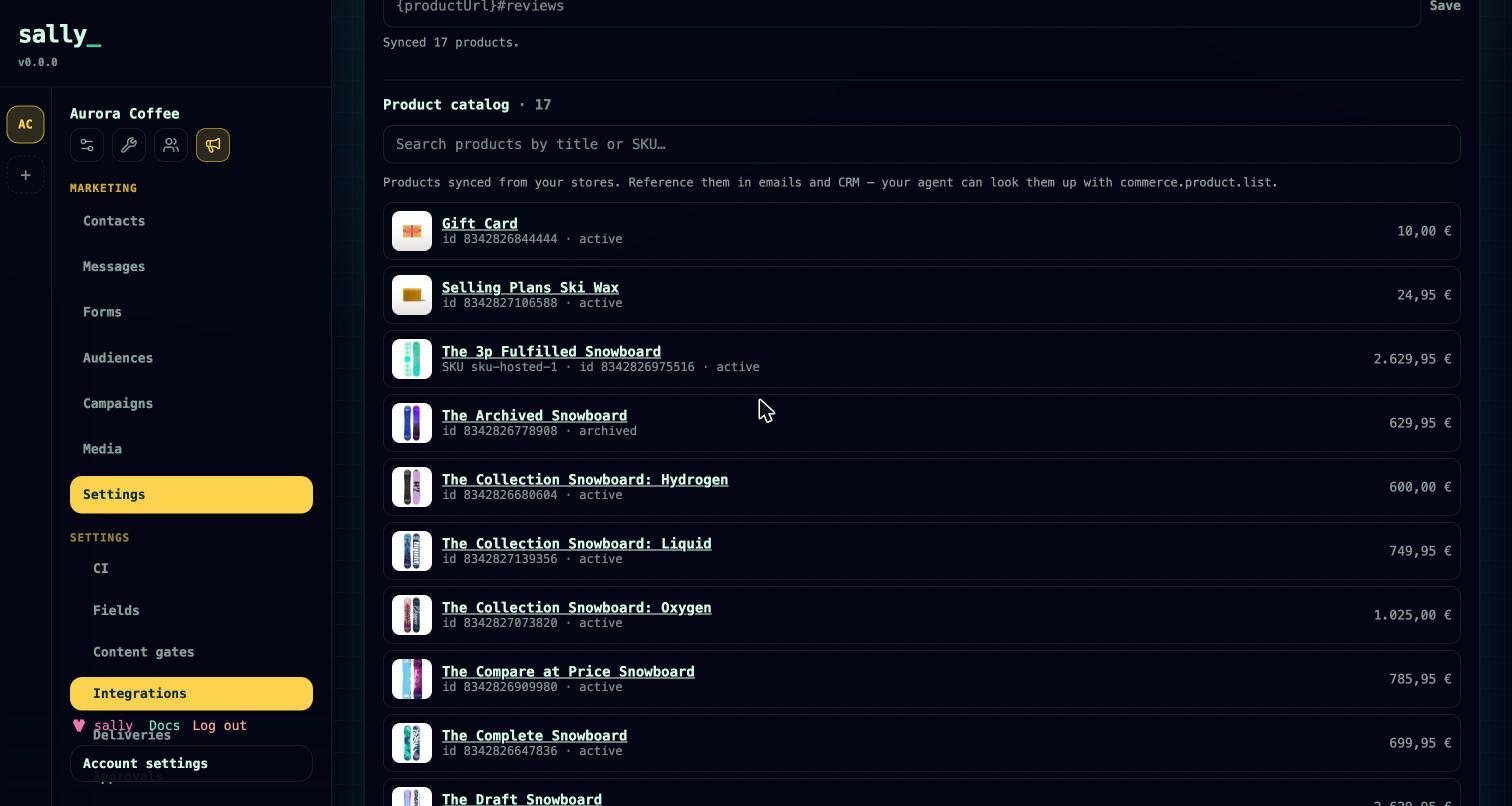
commerce.product.list.Customer value profile
Every purchasing contact gets a value profile, recomputed from their full order history so refunds and cancellations stay accurate (net spend never goes below zero, and cancelled orders drop out):
- net spent, plus gross and refunded, order count, and first and last order dates
- the distinct products they bought and their order IDs
The profile rolls up across all linked contacts and surfaces on the CRM person via crm.person.get and crm.person.list, so you can sort customers by value and target recognition emails, loyalty coupons, or review requests. See CRM for the person record.
Automatic CRM promotion
When a contact places an order, Sally adds them to your CRM as a person — deduplicated by email, carrying their spend and purchase history — so sales and marketing share one record. It links the relationship graph, merges labels, and records a conversion event. This is on by default and can be turned off per brand under Marketing → Settings (or via marketing.settings.*).
Loyalty and order triggers
Store events start campaigns through commerce triggers:
- Lifetime-spend milestones — set spend tiers per brand. When a customer's net spend crosses a tier for the first time, Sally emits a single
commerce.value_threshold_reachedevent (once per milestone) that can start a loyalty flow. - Per-order amount conditions — commerce triggers accept a minimum and maximum amount, checked against the order total, cart total, refund total, or net spend, and can filter by store and source.
- Abandoned checkout — start a flow on
commerce.checkout_startedand pair it with a wait-until step oncommerce.order_placedto recover carts that never convert.
Product blocks and review links
Marketing emails can include a product block that pulls from the synced catalog, and a review link whose URL is configurable per store. The review-link template supports {productUrl}, {handle}, {sku}, and {productId} placeholders and defaults to {productUrl}#reviews — set it to match your reviews app (for example, Judge.me uses {productUrl}#judgeme_product_reviews). Edit it in the store panel. See the email builder for how blocks are assembled.
Shopify GDPR compliance webhooks
Shopify requires three mandatory compliance webhooks, and Sally handles all of them at a single URL (surfaced in the connect UI to paste into your Shopify app config), verified by your app's client secret:
- customers/redact — deletes the matching contacts and scrubs linked CRM person PII.
- shop/redact — deletes the shop's events and the store connection (cascading its synced products).
- customers/data_request — locates the customer's data and records an audit note.
These are strictly tenant-scoped: a request resolves only to the brand that connected that shop and the exact-email contact within it, so a same-email contact in an unrelated brand is never touched. Every compliance action writes an audit log.
Disconnecting
Disconnecting a store deletes the connection and cascades its synced products (the UI confirms before deleting). Order events already recorded on contacts remain. Use commerce.store.disconnect to do this from an agent.
Privacy
Customer data received from a connected store is processed on your behalf to provide the features you enable. See the Privacy Policy for how this data is handled, retained, and deleted.
Roadmap
Shopify and WooCommerce are the shipped connectors today. The provider-adapter design means other platforms (for example Magento, BigCommerce, or Medusa) can be added as adapters against the same event pipeline; those are not available yet.