Marketing
Sally Marketing is GDPR-first marketing automation, one instance per brand (workspace). It holds its own lightweight contacts, per-purpose consent, audiences, forms, an email builder, and a visual campaign engine — and shares contacts, brand memory, and the approval model with the rest of Sally, so a store order or a CRM deal can drive a flow. Sending is email only (SMTP or Amazon SES), and every mass send is gated behind human approval.
Contacts and custom fields
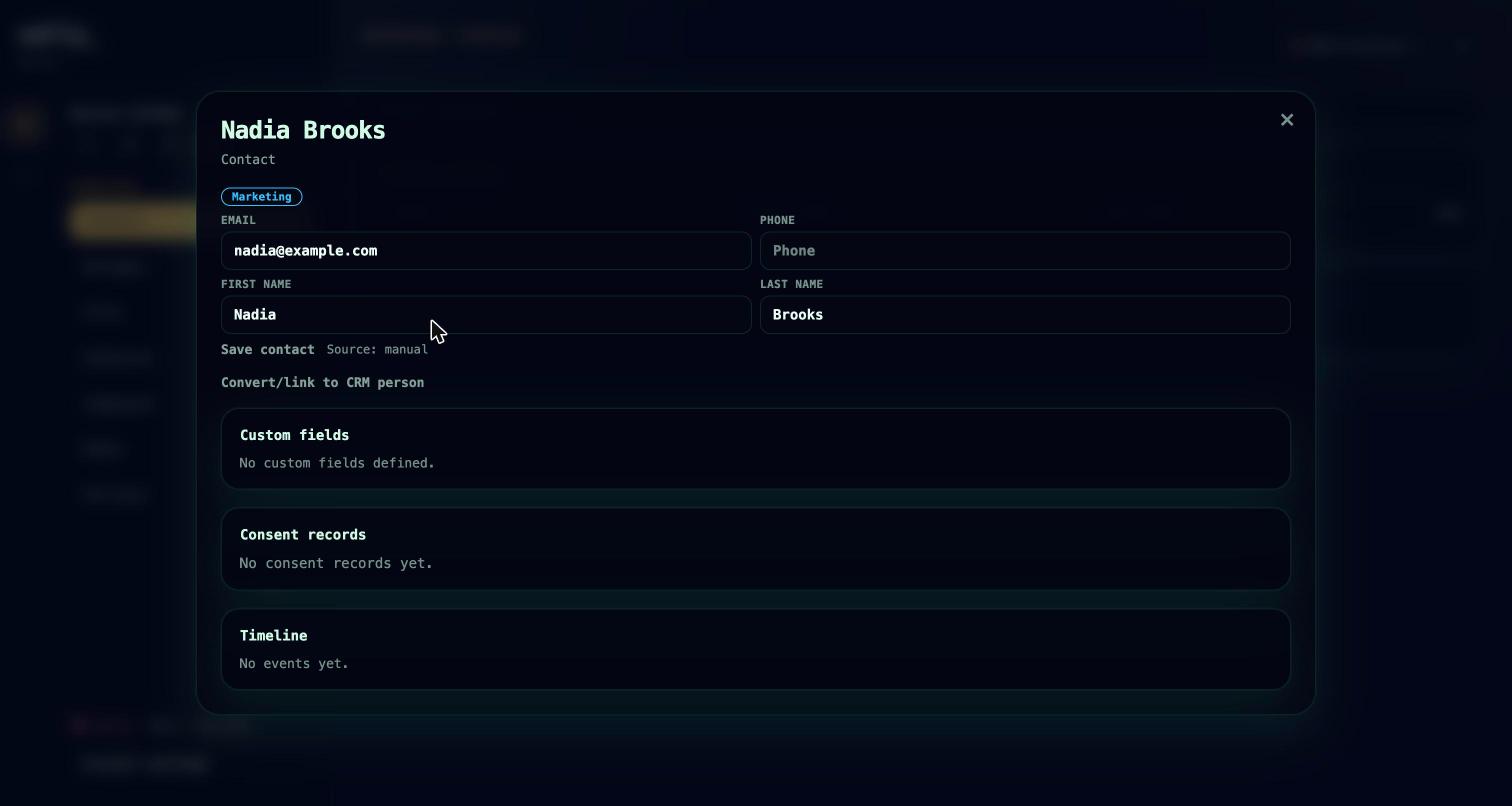
A marketing contact is a lightweight lead or subscriber: identity, labels, a lead score, a free-text lifecycle stage, and a bag of custom fields. Contacts link to a CRM person and carry a commerce value profile (see Connect your store) when one exists.
- Custom field definitions come in 12 types: text, textarea, number, boolean, date, email, phone, URL, country, language, single-select, and multi-select. Fields can be marked required, segmentable, and (for selects) given options. Guardrails keep the contact record bounded (up to 50 active field definitions, size caps per field and per contact).
- Score is set absolutely or nudged relatively from a flow (
score_adjust). Stage is a free lifecycle label you define. - Each contact has a timeline aggregating form submissions, deliveries, consent changes, and events.
- Convert a contact into a CRM person when a lead becomes a relationship.
Agent tools: marketing.contact.list / .create / .update / .timeline / .convert_to_crm / .suppress / .unsuppress, and marketing.field.list / .create / .update.
Consent
Consent is tracked as one record per contact per purpose, with full provenance (source, the exact consent text and its version, locale, IP, user agent, timestamps). Purposes include newsletter, transactional, and content access. States are pending, confirmed, withdrawn, and rejected.
- Double opt-in: a pending consent mints a confirmation token (14-day TTL) and a confirmation URL. If a double-opt-in message and an enabled sender exist, Sally sends it automatically; a form can also confirm instantly when double opt-in is disabled for that form.
- Suppression (“do not contact”): a suppressed contact is excluded from every send — marketing and 1:1 — regardless of consent. Suppression is set automatically on a hard bounce or spam complaint (via the SES feedback webhook), by an unsubscribe, or by the campaign
suppressaction; and manually from the contact card (a Do not contact toggle, which shows the reason) or withmarketing.contact.suppress/.unsuppress. Marking a contact do-not-contact also withdraws their active consent; lifting it does not re-subscribe them — a withdrawn consent needs a fresh opt-in first. - Unsubscribe: every marketing email carries the unsubscribe link and a one-click
List-Unsubscribeheader; using either withdraws that purpose's consent. - Confirming consent fires a
consent_confirmedtrigger you can start flows from.
Consent and suppression are enforced at send time, not only at capture: when an approved send is materialized, and again when each delivery is dispatched, Sally re-checks that the contact has a confirmed opt-in for the message's purpose and is not suppressed. Contacts that fail the check are skipped (recorded as an email.skipped event), never sent to. A brand postal address must also be set — it is legally required in the footer — before any marketing send.
Consent is written through form submissions rather than a dedicated tool; inspect it via marketing.contact.timeline.
Audiences and segments
An audience is a named list, built either from manual members or from segment rules materialized on demand.
- Rules are an
alllist of conditions on fields, with operators equals, not-equals, contains, not-contains, exists, and not-exists (up to 10 conditions), plus an optional consent filter (purpose + status, defaulting to confirmed). - Sync materializes the current matches and stamps the last-synced time. Duplicate an audience to branch from it.
- Audiences bind to messages and forms, and flows can add or remove contacts (
add_audience/remove_audience). Joining an audience fires anaudience_joinedtrigger.
Agent tools: marketing.audience.list / .create / .update / .sync / .duplicate / .contact.add.
Forms and content gates
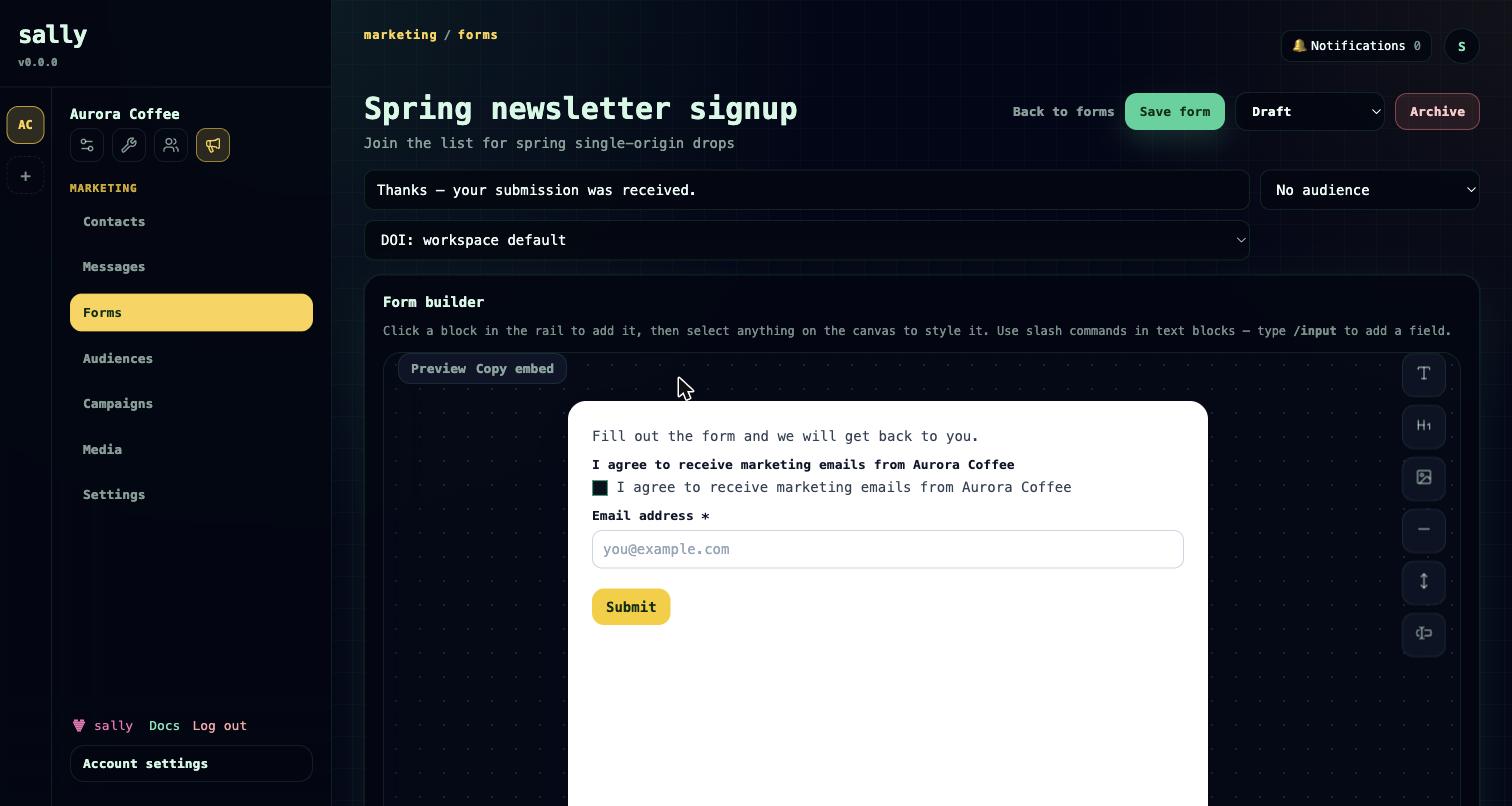
Forms capture leads from any site. A form has a public key, a status (draft, published, paused), field blocks, a submit label and success message, per-form double-opt-in settings, and an optional bound audience. Field types include text, email, phone, textarea, select, checkbox, hidden, and consent — each mappable to a contact field or custom field, and consent fields carry a purpose and double-opt-in flag. Submit through the hosted endpoint, the embed endpoint, or marketing.submission.create.
Content gates protect access to content separately from marketing consent — verifying an email to read a whitepaper is not the same as agreeing to be marketed to. A gate has a key, an unlock mode, an optional required audience or required consent purpose, and a token TTL. Unlock modes: after submission, after email verification, on confirmed marketing consent, on audience membership, or manual/API grant. A content_gate_submitted trigger lets a flow react to a gate unlock.
Agent tools: marketing.form.list / .create / .update / .duplicate / .submissions, marketing.submission.create, and marketing.content_gate.list / .create / .update.
Campaigns and flows
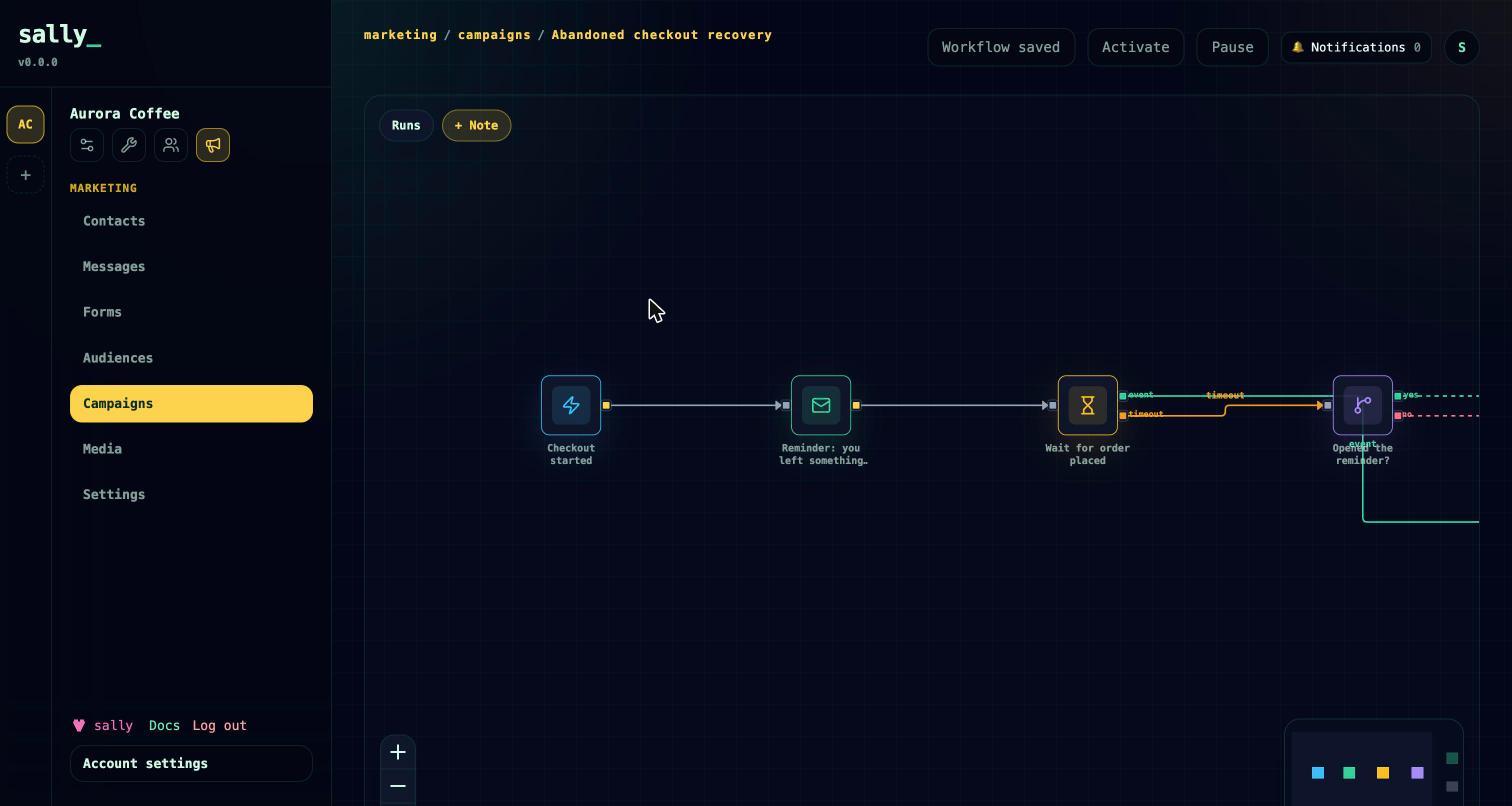
Campaigns are visual node graphs. A campaign holds an immutable version snapshot; activating it snapshots the current graph, and runs execute against that version step by step. A run tracks either a marketing contact or a CRM subject, and Sally dedupes to one active run per campaign-version per contact.
Node types: trigger (exactly one), wait (fixed delay), wait_until (park until an event arrives or a timeout fires, branching on which happened), send_email (queues a delivery), decision (yes/no on a metric such as engagement, opened, clicked, consent, or score), action, end (you can have several), and note.
Triggers include: manual, form_submitted, audience_joined, content_gate_submitted, consent_confirmed, email_opened, email_clicked, crm_person_created, crm_deal_created, crm_deal_stage_changed, crm_deal_won, crm_deal_lost, and the commerce triggers commerce_cart_updated, commerce_checkout_started, commerce_order_placed, commerce_order_cancelled, commerce_order_fulfilled, commerce_order_refunded, and commerce_value_threshold_reached. Triggers can be scoped by data such as audience, form, gate key, consent purpose, store, source, and min/max amount.
Actions include: crm_handoff, score_adjust, tag_add / tag_remove, stage_set, add_audience / remove_audience, suppress, delete_contact, crm_create_follow_up, crm_update_deal_stage, task_create, memory_create, and agent_job (dispatch work to an agent). Work an agent_job produces still passes through approvals — see Governance.
The wait_until node is two-phase: an early matching event resumes a parked run, otherwise the timeout branch fires. Pair commerce_checkout_started with a wait_until on commerce_order_placed to build an abandoned-checkout flow. Validation enforces a single trigger, reachability, and correct branch handles before activation; editing an active graph requires re-activation, which snapshots a new version.
Agent tools: marketing.campaign.builder_schema / .validate_graph / .list / .create / .create_simple_sequence / .update / .activate / .pause / .start_test / .runs / .clear_test_runs / .duplicate / .step.retry / .step.cancel.
The email builder
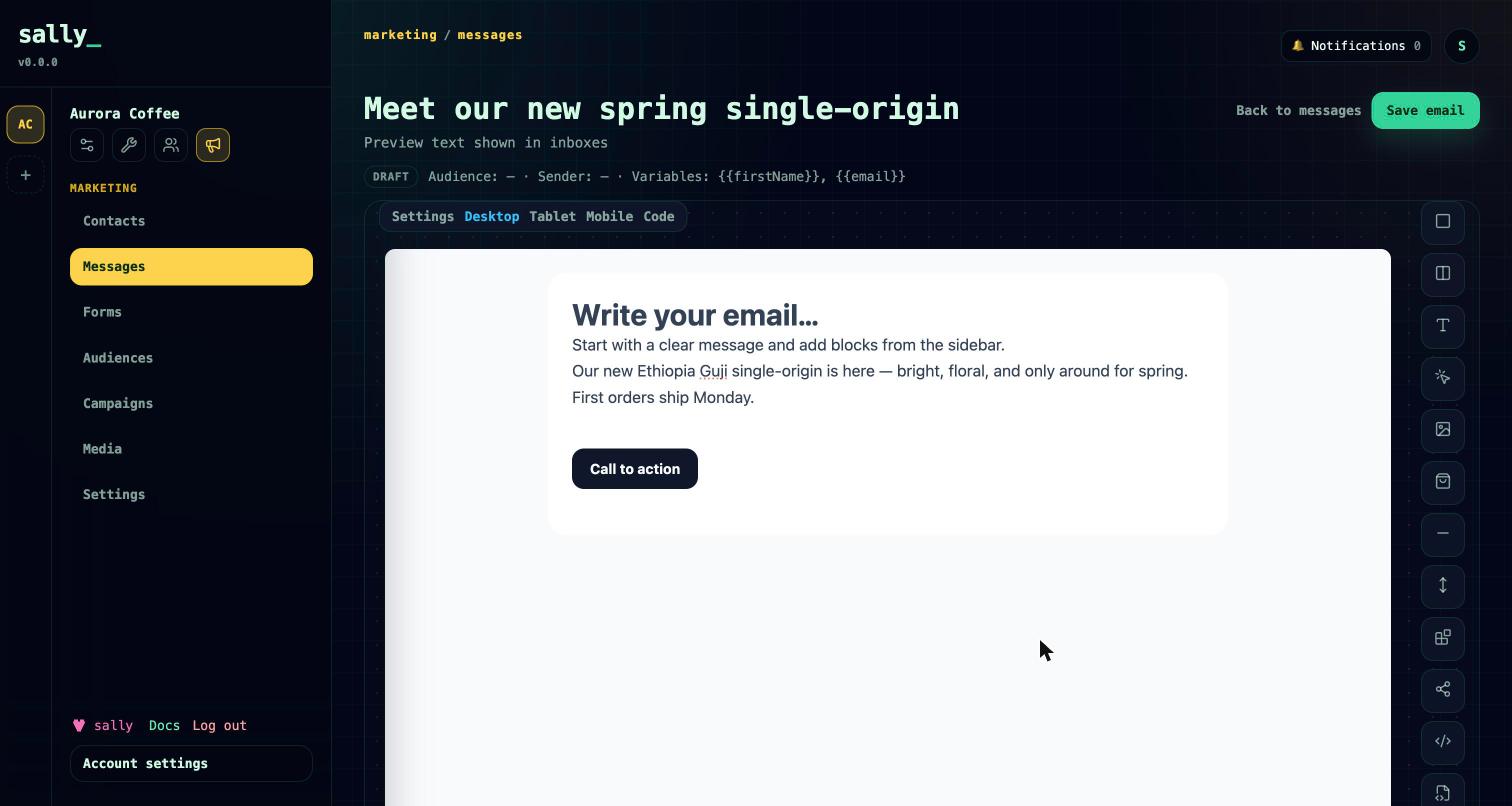
Messages render from a tree of design blocks; generated HTML, MJML, and text are kept as send fallbacks. A message is one of three kinds: marketing (sendable), double opt-in (uses the {{confirmationUrl}} placeholder), or partial (a reusable section, not sendable on its own).
Block types: section, columns (two-column, stacks on mobile) and column, heading, text (HTML or markdown, styled from brand typography), button, image, social (channels and styling from brand CI), divider, spacer, code, MJML/custom MJML, partial (embeds another partial), field (for forms), and the product block. The product block renders a product card — image, title, price text, a buy button, and an optional review link — pulled from your synced commerce catalog (see Connect your store). Common styling keys cover width, colors, borders, radius, alignment, spacing, and fonts.
- Reusable partials expand inline at send time; editing a partial updates every message that embeds it. A workspace header and footer partial wrap every marketing email (double-opt-in messages intentionally skip this chrome).
- Personalization placeholders:
{{firstName}},{{lastName}},{{email}},{{brandName}}, and{{confirmationUrl}}. - Rendering applies the brand body background, a configurable width, responsive collapse, a preheader, an unsubscribe footer, and an open-tracking pixel.
marketing.message.import_htmlconverts existing HTML into editable blocks. Test sends deliver to your own inbox before anything else happens.- Shareable preview link. A public view in browser link — the Preview link button on a message, or
marketing.message.preview_link— renders the email at a stable URL your clients can open to review it, no Sally account needed. Rotate it to invalidate the old link. - A media library stores uploaded images (compressed, resized to a max dimension).
Agent tools: marketing.message.list / .create / .update / .duplicate / .delete / .import_html / .preview / .preview_link / .send_test / .propose_send / .propose_ready / .send_readiness, marketing.design.builder_schema, and the media tools marketing.media.*.
Senders and deliverability
Each brand configures its own sender: provider SMTP or Amazon SES, with encrypted credentials, from name and address, reply-to, and a health status. SMTP sends through nodemailer; SES sends through the SES v2 API. A health check validates configuration without sending, and a test send delivers a real message. Senders can be scoped to which systems (projects, CRM, marketing) may use them. For SES, an inbound feedback webhook maps delivery, bounce, complaint, rejection, open, and click events back onto deliveries and contacts.
Agent tools: marketing.sender.list / .create / .update / .delete / .check_health / .send_test.
Review, approve, and send
Mass sends are proposals, not buttons — and agents cannot send directly. On a message, Review & send opens a panel with a readiness checklist (sender, audience, how many recipients have a confirmed opt-in, the required brand postal address, and content), each with an inline fix, and a status that moves Draft → In review → Approved → Scheduled / Sent.
A message can go out two ways:
- One-off broadcast.
marketing.message.propose_sendcreates a pending approval (scheduled time, estimated recipients, risk report) and moves the message to In review. Approving it hands off to the worker, which fans out one consent-checked delivery per audience member — immediately or at the scheduled time — and marks the message sent. In the panel you choose send now or schedule for later. - Use in a campaign.
marketing.message.propose_readyapproves the message for campaign use with no broadcast — it reaches Approved but is never mass-sent; the campaign delivers it per-recipient when its automation runs. A campaign cannot be activated while a message it sends is still unapproved (or the brand postal address is unset).
Proposing and approving can be the same person (self-approve, one click in the panel) or split — an agent that drafts a newsletter on your behalf leaves it In review for you to approve yourself. Reject returns the message to draft. Use marketing.message.send_readiness to check what a message still needs before proposing. Partials cannot be proposed.
See Core concepts for how approvals work across Sally.
Agent tools: marketing.message.propose_send, marketing.message.propose_ready, marketing.message.send_readiness, marketing.approval.list / .approve / .reject.
Deliveries
Every send is a delivery with a full ledger of statuses: queued, sending, sent, failed, bounced, complained, opened, clicked, unsubscribed, and cancelled — plus provider message id, attempt count, and failure reason. The worker claims queued deliveries, renders and sends them, and retries failures with backoff up to a configured maximum. Retry a failed delivery or cancel a queued one.
Agent tools: marketing.delivery.list / .get / .retry / .cancel.
Website tokens and embedding
Website tokens authenticate submissions and events coming from your own site. Each token is stored hashed, scoped to allowed origins and scopes, and can carry an expiry. Tokens authorize the embed endpoints for form submissions, content-gate checks, and commerce events, plus the open-tracking and unsubscribe endpoints.
Agent tools: marketing.website_token.list / .create / .revoke.
Brand CI
Brand identity lives in the workspace CI settings and feeds the email builder: body background, default width, text and button colors and fonts, heading and body font stacks, accent and primary/secondary colors, and a logo. Social blocks draw their channels and icon style (color, mono, or custom) from CI, and per-channel icons are served as images. CI defaults flow into every message and stay overridable per block.
Agent tools: brand.ci.get / brand.ci.update.
Marketing settings
Workspace marketing settings tie the pieces together: the default double-opt-in message, the header and footer partials that wrap marketing emails, whether purchasers are auto-promoted to CRM, and the lifetime-spend milestones that emit commerce_value_threshold_reached (see Connect your store).
Agent tools: marketing.settings.get / .update, and marketing.addon.info.
Roadmap
- Additional channels. Message and consent models declare SMS, WhatsApp, and Telegram, but only email (SMTP / SES) is implemented today; the other channels are not yet available.
With agents
The whole marketing surface is available over the hosted MCP: drafting messages in the builder format, assembling and validating campaign graphs, managing contacts, fields, audiences, forms, and gates, and inspecting deliveries. Agents propose sends but never send — a human approves every mass send. See Connect your agent.